
Vehicle Compliance & Analysis
| TO: Mercedes-Benz Dealer Principals, General Managers, Sales Managers, Service Managers, Parts Managers | FROM: Gregory Gunther, Department Manager, Vehicle Compliance and Analysis, Engineering Services |
| RE: Emission Modification Notification – [[2020050030]] MY 16 E250 (W212) BlueTEC Update – Emission Modification Category (EMC) #12 | DATE: May 27, 2022 |
IMPORTANT EMISSION MODIFICATION NOTIFICATION
Attention Dealership Management
- Please ensure that every dealership associate is aware of this Emission Modification notification, and that customer facing associates provide transparent information to Customers.
- Refer to VMI in NetStar to determine which units in your inventory are affected by this Emission Modification. This notification hereby instructs Dealers not to sell or cause to be sold, or lease or cause to be leased, or introduce into commerce, or export from the United States to another country, any vehicle covered by this notification, unless it has received the Approved Emission Modification described in this notification. Failure to adhere to these instructions may result in possible penalties or fines.
- Run a VMI check on all vehicles brought into your Service Department to determine if they are affected by any service campaign or recall and perform accordingly.
- Always act with the principles of Customer Experience in mind.
- Refer to the work instructions and ensure each step in the defined process is followed exactly as described. Steps such as affixing the vehicle label and correctly filling out the vehicle label must be adhered to. Failure to adhere to these instructions may result in possible penalties or fines.
- Ensure your warranty administrator submits warranty claims for this Emission Modification in a timely manner. Extended warranty applicability stated herein is automatically enabled once the Approved Emission Modification is completed and the warranty claim is processed.
- A proposed class action settlement has been filed that provides compensation to customers who receive the Emission Modification and meet certain other requirements. To receive such compensation, class members will need to submit (among other things) copies of their Repair Order showing proof that the Emission Modification was installed and (if any) proof of transportation expenses incurred to receive the Emission Modification—up to $35—in the event that a loaner, shuttle, or alternative transportation cannot be arranged by your dealership. Please remind customers to save this documentation.
- Customers should not be given information about the Emission Modification or the class settlement that deviates from, or is in addition to, what is in authorized communications reflected in this NCU or the official websites: https://www.mbbluetecsettlement.com/ and https://bluetecupdate.mbusa.com/home. Failure to adhere to this instruction could threaten final implementation of the settlement and may result in possible penalties.
Other than the benefits class members can claim through the class action settlement process, customers cannot be offered any compensation in exchange for receiving the Emission Modification. Failure to adhere to this instruction may result in possible penalties. (At their discretion and on a case-by-case basis, Dealers can continue to offer customers goodwill for other reasons consistent with normal business practices and policies, but additional compensation in exchange for receiving the Emissions Modification is prohibited.)
Information for Customers:
- For information related to this specific Emission Modification, Customers can refer to: https://BlueTecUpdate.mbusa.com
- For information related to the proposed class action settlement, Customers can refer to: www.mbbluetecsettlement.com
- Mercedes-Benz Customer Assistance Center: 1-833-841-9362
Please note that all customer inquiries should be directed to the Customer Assistance Center at 1-833-841-9362.
Sincerely,
Gregory Gunther
Department Manager, Vehicle Compliance & Analysis
| Emission Modification Notification | March 17, 2021 | ||
| Campaign No.: | EMC# | Campaign Desc. : | BlueTEC Update – MY16 E (W212) |
| 2020050030 | 12 | 19P4992021 | |
| This is to notify you of an Emission Modification to update the emission control system on approximately 629 Model Year (“MY”) 2016 E250 BlueTEC (W212) diesel vehicles. Emission Modification information will be visible on the https://BlueTecUpdate.mbusa.com website and may generate questions from Owners and Lessees. Affected VINs will be flagged in VMI as “OPEN” on March 17, 2021. | |||
| Background | |||
| Issue | Mercedes-Benz USA, LLC (“MBUSA”) is modifying the emission control system on certain diesel vehicles. The Emission Modification for MY16 E250 BlueTEC (W212) vehicles has been approved by EPA and CARB, and is now ready for installation. An authorized Mercedes-Benz Dealer will install the Emission Modification at no cost to the Owner/Lessee. | ||
| What We’re Doing | An authorized Mercedes-Benz Dealer will replace certain emission control system components and update certain software in eligible vehicles. | ||
| Parts | An initial supply of parts will be pushed to all dealers 1/11/21. Additional parts are available to order as necessary. | ||
| Vehicles Affected | |||
| Vehicle Model Year(s) | MY 2016 | ||
| Vehicle Model | E250 BlueTEC (W212) | ||
| Vehicle Populations | |||
| Total Campaign Population | 629 | ||
| Total Customer Vehicles in Campaign | 629 | ||
| Next Steps/Notes | |||
| Customer Notification Timeline | Customer letters will begin to be mailed on March 23, 2021 | ||
| AOMS/SOMS | This Emission Modification Notification may initiate questions from customers and the media. Please ensure your Dealers have read and understand this notice. | ||
| Notes |
| ||
| While we regret any inconvenience this may cause, MBUSA is determined to maintain a high level of vehicle quality and customer satisfaction. Please refer all customer inquiries to the Customer Assistance Center at 1-833-841-9362. | |||
DEALER FAQs
What is the reason for this Emission Modification?
On March 9, 2021, Daimler AG (“DAG”) and Mercedes-Benz USA, LLC (“MBUSA”) reached a settlement with the United States Department of Justice (“DOJ”), the Environmental Protection Agency (“EPA”), the California Air Resources Board (“CARB”), and the California Attorney General’s Office (“CA AG”) regarding the emission control system in MY09 to MY16 OM642 and OM651 BlueTEC II diesel vehicles sold or leased in the US. As part of this settlement, MBUSA is offering eligible Owners and Lessees a modification to the vehicles’ emission control system, referred to as an Emission Modification.
Eligible vehicles and vehicle model years have been separated into Emission Modification Categories (“EMCs”) to facilitate the Emission Modification Program. Each EMC will be launched in phases, and MBUSA will notify authorized Mercedes-Benz Dealers after agency approval of each Emission Modification. Please refer to our public website https://BlueTecUpdate.mbusa.com for more information on your particular vehicle.
Is this a recall?
No, this is NOT a recall. As part of the settlement with the US authorities, DAG and MBUSA are offering eligible vehicle Owners/Lessees a modification to the vehicles’ emission control system, referred to as an Approved Emission Modification (AEM). This modification will be performed at no cost to the Owner/Lessee.
What is an “EMC”?
To facilitate the Emission Modifications on the subject vehicle population, the vehicle models and model years have been separated into Emission Modification Categories.
What are the eligible vehicles that will receive an Emission Modification under this settlement?
This settlement pertains specifically to MY09 to MY16 BlueTEC II diesel vehicles with OM642 and OM651 engines sold or leased in the US. For more information, please visit https://BlueTecUpdate.mbusa.com.
How will the Emission Modification be communicated to Owners and Lessees in the US?
Owners/Lessees will first receive a letter in the mail indicating that the Emission Modification is available for their vehicle and inviting them to schedule an appointment with their preferred authorized Mercedes-Benz Dealer.
How do Owners and Lessees find out whether their vehicle is affected by the Emission Modification Campaign?
Owners and Lessees with affected vehicles will be mailed a notification letter when the Emission Modification is available. Owners and Lessees can also check if their vehicle is affected by entering their VIN into the following site: https://BlueTecUpdate.mbusa.com.
All vehicles covered by the Emission Modification Program also are covered by the proposed class action settlement described herein.
Owners and Lessees might complain about a Check Engine light; will the Dealer repair the vehicle as part of the emissions update?
A Check Engine light can illuminate for a number of reasons. Authorized Mercedes-Benz Dealers can offer assistance diagnosing and repairing the issue.
Can an Owner or Lessee get a loaner vehicle or alternate transportation while the Emission Modification is being performed?
Where loaner vehicles are available, Dealers are requested to offer loaner vehicles to each Eligible Owner and Eligible Lessee at no cost where the implementation of the Approved Emission Modification will take 3 hours or longer to complete.
In an instance where the Approved Emission Modification takes 3 hours or longer to complete, and where the Dealer does not make available a loaner car or offer a shuttle service or alternative transportation, Class Members will be eligible to submit a claim for transportation costs of up to $35 along with their claims for other settlement compensation. For more information on the transportation allowance, customers should visit the class action settlement website at www.mbbluetecsettlement.com, and should be reminded to save their receipts.
What is Mercedes-Benz going to do for Owners and Lessees given this inconvenience?
Dealers will attempt to minimize any inconvenience during the Emission Modification process. Should Owners or Lessees experience an excessive delay with the Emission Modification of their vehicle, they can contact our Customer Assistance Center at 1-833-841-9362.
As part of the proposed consumer class action resolution, current owners and lessees of eligible vehicles who go to authorized Mercedes-Benz Dealers, have an Approved Emission Modification installed, and meet certain other requirements will be eligible to claim a payment of up to $3,590. For more information on eligibility and the process for filing a claim, customers should call the number above or visit the class action settlement website at www.mbbluetecsettlement.com.
Other than the benefits that class members can claim through the class action settlement process, customers cannot be offered any compensation in exchange for receiving the Emission Modification. Failure to adhere to this instruction may result in possible penalties. At their discretion and on a case-by-case basis, Dealers can continue to offer customers goodwill for other reasons consistent with normal business practices and policies, but additional compensation in exchange for receiving the Emission Modification is prohibited.
Where can an Owner or Lessee have the Emission Modification work completed?
Owners and Lessees will be asked to contact their local preferred authorized Mercedes-Benz Dealer to arrange for an appointment to complete the FREE Emission Modification.
Can Owners and Lessees have the Emission Modification performed if they did not receive a Notification Letter in the mail but own a Mercedes-Benz BlueTEC diesel vehicle?
Owners and Lessees should first check the eligibility and status of their vehicle by visiting https://BlueTecUpdate.mbusa.com. To be automatically alerted when the Emission Modification is available for their vehicle, Owners and Lessees are being asked to complete the “Keep me Updated” section of the website after entering their VIN to check the status.
Do Owners and Lessees have to wait for the notification letter in the mail before their vehicle can receive the Emissions Modification?
Owners and Lessees do not need to present a copy of the notification letter to receive the FREE Emission Modification, but they should wait to bring their vehicle in for the Emission Modification until they receive notice that the Emission Modification has been launched for their specific vehicle model. The Emission Modifications will be launched in phases, pending agency approval, so the Emission Modifications for all of the subject vehicle models (all MY09 to MY16 BlueTEC II diesel vehicles with OM642 and OM651 engines sold or leased in the US) will not be launched at the same time. Once the Emission Modification has been approved for a particular vehicle type, Owners and Lessees will be sent a letter asking them to schedule an appointment with their authorized Mercedes-Benz Dealer to perform the FREE Emission Modification.
Do Owners or Lessees need the Owner/Lessee notification letter to have the Emission Modification performed?
No, Owners and Lessees with eligible vehicles do not need the notification letter to have the FREE Emission Modification completed. Local authorized Mercedes-Benz Dealers can check the eligibility and status of vehicles without the letter.
What about Owners or Lessees who request that the Emission Modification be performed without first receiving a letter?
No Emission Modification can be performed until EPA and CARB approve the Emission Modification for the specific model. Similarly, the affected VIN must be flagged as “OPEN” in VMI with the respective Emission Modification campaign number for the modification to be performed.
When will parts be available?
Parts are currently available for the Emission Modifications which have been approved by EPA and CARB. We will provide updates as parts become available for other vehicle models.
Regarding all other future vehicle categories, MBUSA is working with EPA and CARB to obtain approvals for the Emission Modification. MBUSA will notify Dealers upon approval of each Emission Modification that the Emission Modification has become available.
For up-to-date parts availability information, please refer to the website https://BlueTecUpdate.mbusa.com.
Are there any known vehicle symptoms associated with the Emission Modification that Owners or Lessees will notice that should lead them to stop driving or take their vehicle to a Dealer?
No. There are no symptoms related to the Emission Modification.
What is the expected impact on an Owner’s or Lessee’s vehicle after the Emission Modification has been performed?
Details on the impact to vehicles are provided in the letter for each Emission Modification Category. A copy of the Owner/Lessee letter for the EMC subject to this FAQ is attached.
What types of repairs or replacements are needed?
Authorized Mercedes-Benz Dealers will replace specific emissions-related components. This varies by model and model year. For more information, please visit https://BlueTecUpdate.mbusa.com.
How long does this Emission Modification take?
Replacement time is dependent upon the model and model year. This time may range from 30 minutes to a maximum of 6 hours. Details are provided in the Owner/Lessee notification letter.
What if vehicles have been modified using after-market parts and/or software? Can the Emission Modification still be performed?
If, prior to receiving the Emission Modification, the vehicle has been modified in a manner that impedes the installation of the AEM or substantially affects the operation of the AEM after install (for example, removal of original emissions components not part of the AEM), dealers might not be able to perform the Emission Modification until the prior modifications are corrected. The Owners/Lessees would be responsible for such corrections. Once corrected, the vehicle may receive the Emission Modification.
What if Owners or Lessees decline to have the Emission Modification performed?
If Owners/Lessees decline the Emission Modification at this time, they will be advised by their authorized MercedesBenz Dealer that certain emissions-related replacement and repair parts (for their existing system) may no longer be available from Mercedes-Benz at some point in the future. Additionally, the current vehicle Owner/Lessee will not be able to make a compensation claim as part of the proposed class action settlement without first having the Emission Modification performed on their vehicle.
Will eligible vehicles have any warranty on the Emission Modification?
Yes. Once the Emission Modification is performed, certain components will have an extended warranty for the greater of 4 years/48,000 miles from the date of installation of the Emission Modification or 10 years/120,000 miles from the initial sale date of the vehicle. As described in the Customer Letter, some emission-related components have an additional extended warranty period, which is added to the applicable Extended Modification Warranty period above. This extended warranty remains with the vehicle and is fully transferable to subsequent owners until expiration. Where loaner vehicles are available, Dealers are requested to offer loaner vehicles to each Eligible Owner and Eligible Lessee at no cost where extended warranty repairs exceed three hours to complete.
Can Owners or Lessees be denied coverage under the Extended Warranty for the Emission Modification? The Extended Warranty for the Emission Modification may be denied if an eligible vehicle has been altered with the use of any after-market emissions-related components, parts, and/or software, or with the removal of any original emissions-related components, parts, and/or software, and such alteration(s) are likely to substantially affect the operation of the vehicle with the Emission Modifications, until the owner of such vehicle, at his or her expense, has reversed the alteration(s) such that the Emission Modification will not be substantially affected.
Campaign No. 2020050030 March 2021
| TO: | ALL MERCEDES-BENZ CENTERS |
| SUBJECT: | Model E-Class diesel vehicles (212 platform) Model Year 2016 with OM651 Modification to the emission control system |
Mercedes-Benz USA, LLC (“MBUSA”) is performing an emission campaign on certain E-Class diesel vehicles in order to modify the vehicles’ emission control system. EPA and CARB have approved this emission modification for the MY16 E-Class (212) diesel vehicles. An authorized Mercedes-Benz dealer will replace certain emission control system components and update certain software in the affected vehicles at no cost to the owner of the vehicle.
Prior to performing this Emission Campaign:
- Please check VMI to determine if the vehicle is involved in the emission modification campaign and if it has been previously repaired. Always Check VMI for any open campaigns, and perform accordingly.
- Please review the entire Emission Campaign bulletin and follow the repair procedure exactly as described.
Approximately 629 vehicles are involved.
Order No. P-EC-2020050030
This bulletin has been created and maintained in accordance with MBUSA-SLP S423QH001, Document and Data Control, and MBUSA-SLP S424HH001, Control of Quality Records.
Scope of Work:
Work procedure
- Initial Short Test and Pre-Inspection
- Disconnect Battery Ground
- Release air filter housing together with control unit
- Replace Combination Box DOC+DPF
- Install end-cap to O2 sensor electrical harness
- Install Plug for O2 sensor port on the DOC
- Replace SCR
- Replace NOx sensor control unit after the Diesel Particulate Filter (DPF)
- Replace NOx sensor and Particulate sensor control unit downstream of the Selective Catalytic Reduction (SCR) catalyst
- Reconnect Battery Ground
- Connect XENTRY diagnosis
- Perform Xentry Procedure: Service Measure “Exhaust Aftertreatment System” (includes update of CDI, VGS, and SCR software)
- Perform Final Short Test
- Attach the adhesive label
Parts Overview
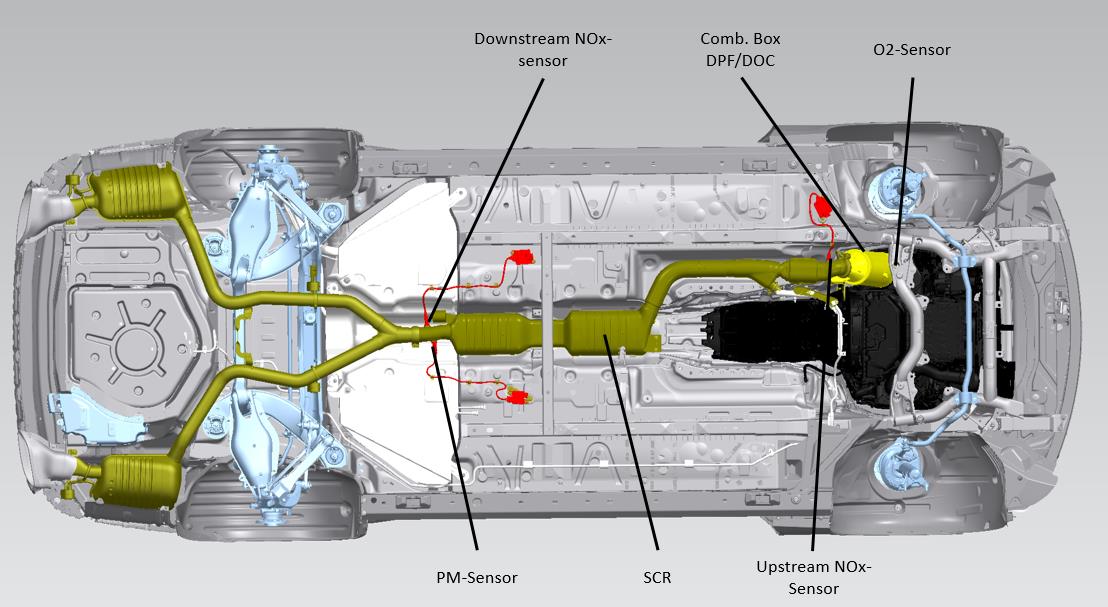
Procedure
- Initial Short Test and Initial pre-inspection
1.2 Connect XENTRY diagnosis.
Note:
- Use DAS/Xentry 09/20 with all associated patches or higher.
- Follow the steps exactly as described in DAS/Xentry.
- Connect battery charger (battery voltage >12.5V).
- Ensure all electrical consumers are switched-off.
- In the event of software/SCN update issues, contact Star Diagnosis User Help Desk. Please refer to the “pre-call” check list before contacting UHD
- Refer to Star Diagnosis System (SDS) Best Practices Guide.
1.3 Perform Pre-Inspection
Follow the Xentry procedure “Emission Modification Pre-Inspection”: “Control units view N3/9 – Motor electronics ‘CR43’ for combustion engine ‘OM651 (CDI) Special procedures Service Measure “Exhaust aftertreatment system” Pre-Inspection
Record findings on workorder and save to paperless
Note: goal of the pre-inspection process is to perform an inspection of the emission system and ensure all components are present and functioning correctly (Check engine light “CEL” ON/OFF). The pre-inspection consists of the following procedures as displayed in the below flowchart:
- Visual inspection of the emissions system to check for non-compliant alterations to the emission system that impedes the installation of the AEM or substantially effects the operation of the AEM after installation. This consists of a brief visual inspection and does not require a technician to confirm if components are operating correctly. (Example: missing emission system components not replaced as part of the AEM)
- If an alteration has been found during the visual inspection that meet the criteria mentioned in point 1, please advise the customer these alterations must be reversed at their expense before to proceed with the AEM. Please follow the below process to submit a warranty claim for the time associated to diagnosis and provide an estimate to the customer.
Warranty Documentation Process:
- Claim against damage code 4910N 01 – Approved Emission Modification Denial
- Up to 2 hours of diagnostic time permitted
- Ensure diagnostic time is properly punched on the RO
- Ensure RO is documented properly including a detailed explanation as to why the modification was denied
- Attach the RO to the warranty claim
- Initial Short Test to check for CEL ON/OFF: Pre-existing issues (CEL ON) may be addressed at the time of AEM install if the components diagnosed are part of the AEM or extended warranty. For all other components, please provide a customer a repair estimate and document if the customer approves/declines the additional repair(s). It is essential the AEM is installed regardless if the customer approved/declines additional repairs to address a preexisting issue. A list of applicable extended warranty parts is available in Xentry for the technician to refer to.
1.4 Pre-Inspection Overview (Figure 1)
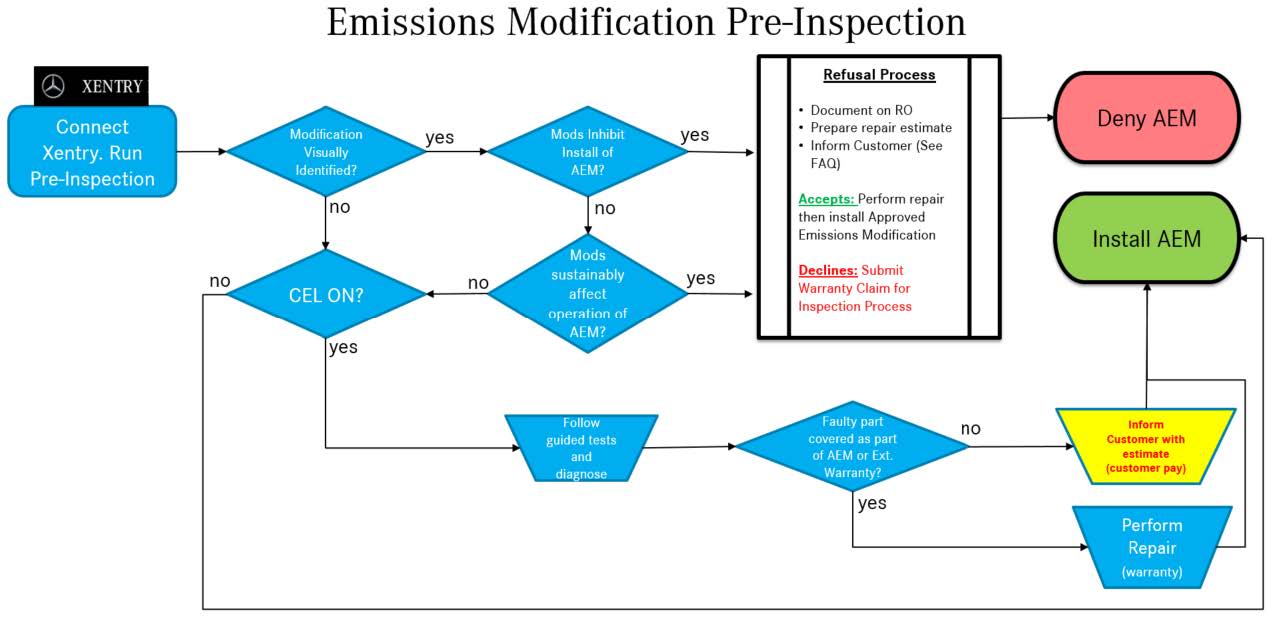
Figure 1
- Disconnect battery ground (AR54.10-P-0003EW).
- Remove the air filter housing (AR09.10-P-1150CD).
- Connect the plug (A 000 545 40 39) (Figure 2) to the engine harness for the oxygen sensor
The electrical connection of the oxygen sensor is no longer required!
- Plug the oxygen sensor on the new Catalyst (DOC) with plug (N 007 604 018 109) and seal (A 021 997 62 45) ( 50, Figure 3).
Oxygen sensor is no longer required!
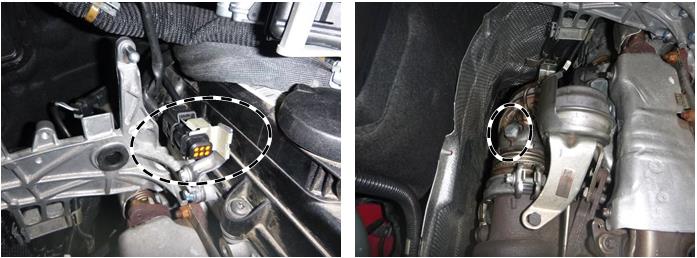
Figure 2 & Figure 3
Basic data see AR61.20-P-1105EW
Only loosen the rear underbody panelling (right and left).
- Replace DOC+DPF.
Basic data see AR49.10-P-5501CD; AR49.10-P-5500OMD.
- Replace components of the exhaust system (SCR catalytic converter).
Basic data, see AR49.10-P-7100EWI.
Remove all adhesive labels on the diesel particulate filter and SCR catalytic converter.
- Replace both NOx sensors and Particulate sensor (AR14.40-P-2038OGE).
It is not necessary to carry out the reset routine using XENTRY Diagnosis.
The new sensors are already equipped with paste, hot lubrication.
The pigtail wire at NOx sensor should be cut for ease of removal and to ensure it is not reused (Figure 4).
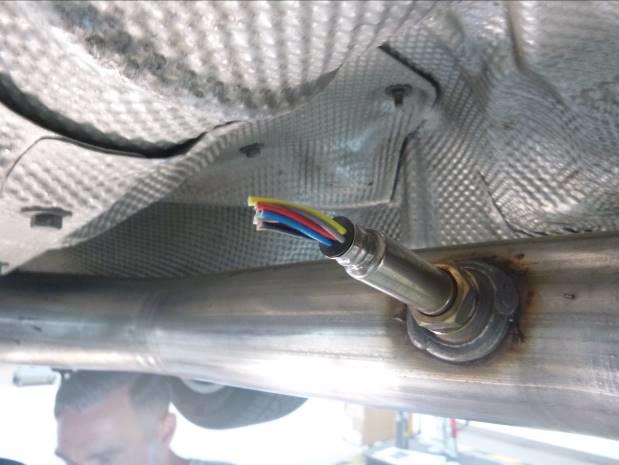
Figure 4
- Reconnect battery ground (AR54.10-P-0003EW).
- Connect XENTRY diagnosis. Update characteristics of the control unit
Note:
- Use DAS/Xentry 6/20 with all associated patches or higher.
- Follow the steps exactly as described in DAS/Xentry.
- Connect battery charger (battery voltage >12.5V).
- Ensure all electrical consumers are switched-off.
- In the event of software/SCN update issues, contact Star Diagnosis User Help Desk. Please refer to the “pre-call” check list before contacting UHD
- Refer to Star Diagnosis System (SDS) Best Practices Guide.
- Perform Xentry procedure “Service Measure Exhaust Aftertreatment System”
To do so, select menu item “Control units view N3/9 – Motor electronics ‘CR43’ for combustion engine
‘OM651 (CDI) Special procedures Perform Service Measure “Exhaust aftertreatment system”
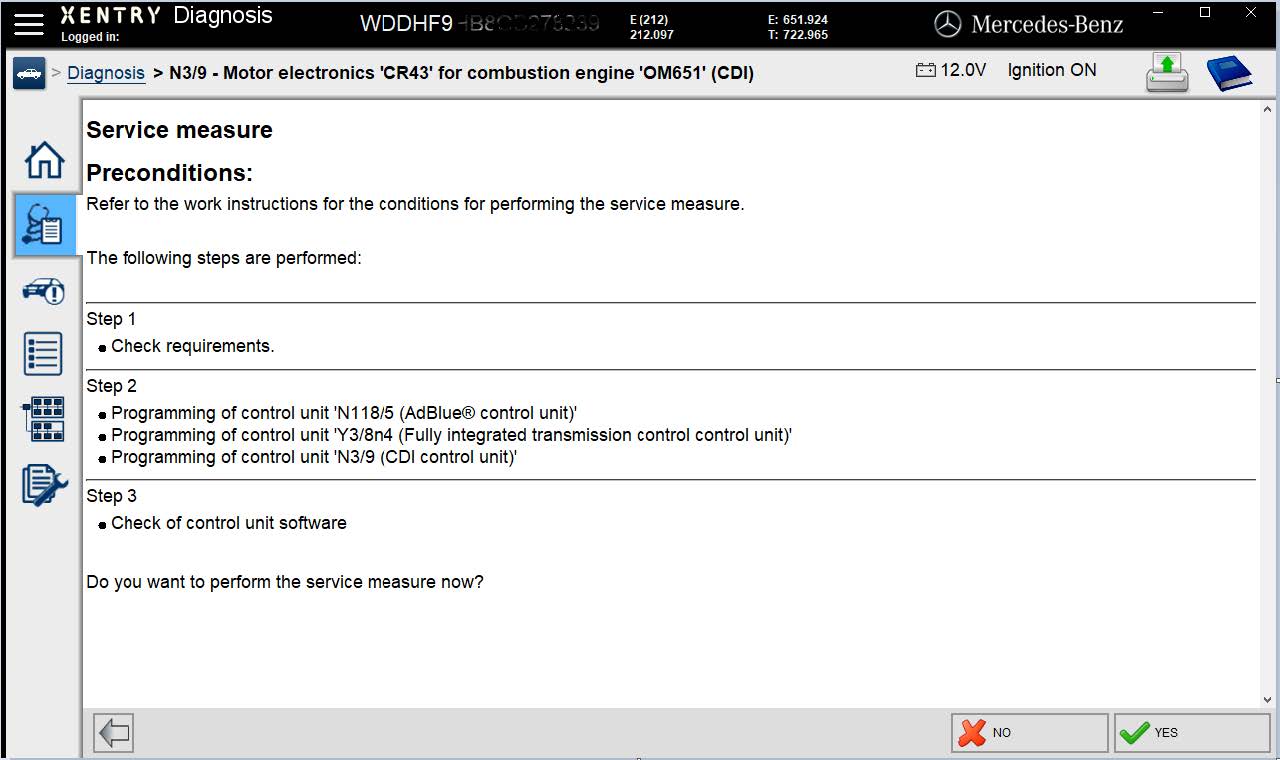
Figure 5
Subsequently, follow the user guide in XENTRY diagnosis.
Additional control units will be updated automatically in the background.
Fill out emission label according to Xentry instructions
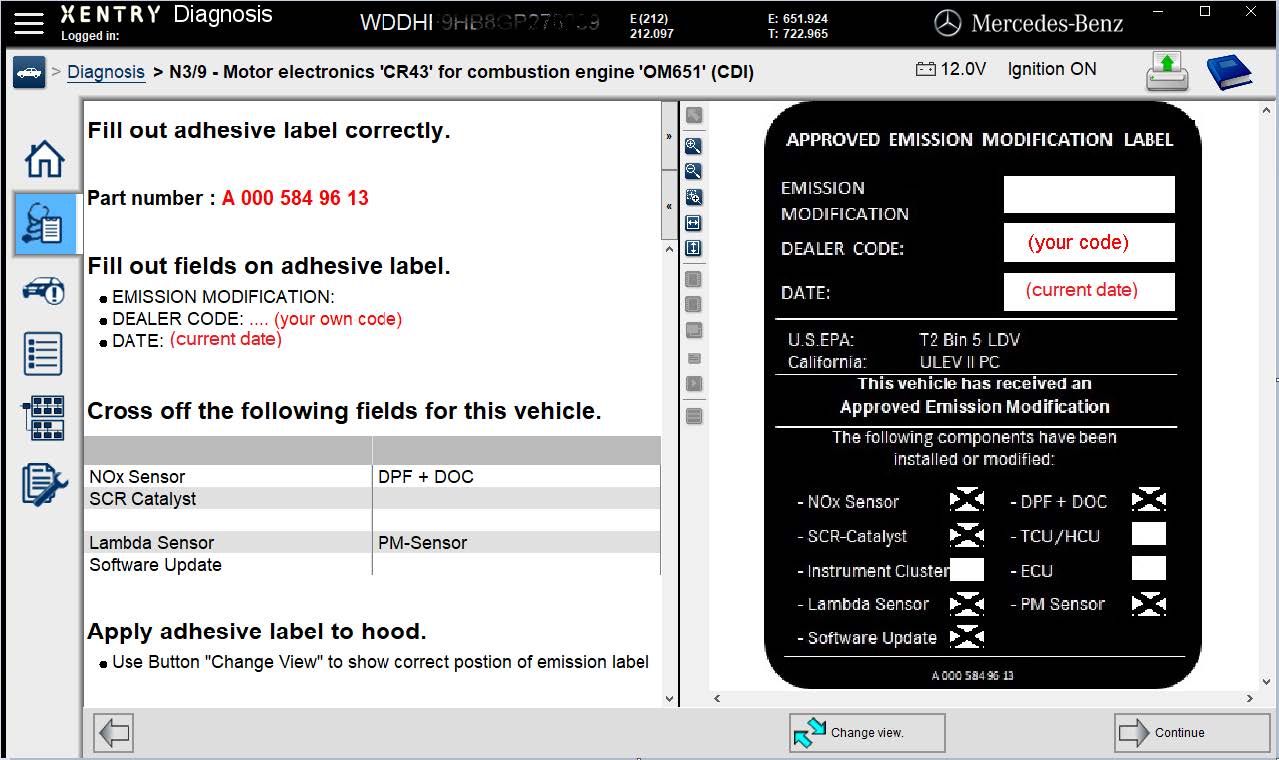
Figure 6
Check screen will be shown at end of procedure.
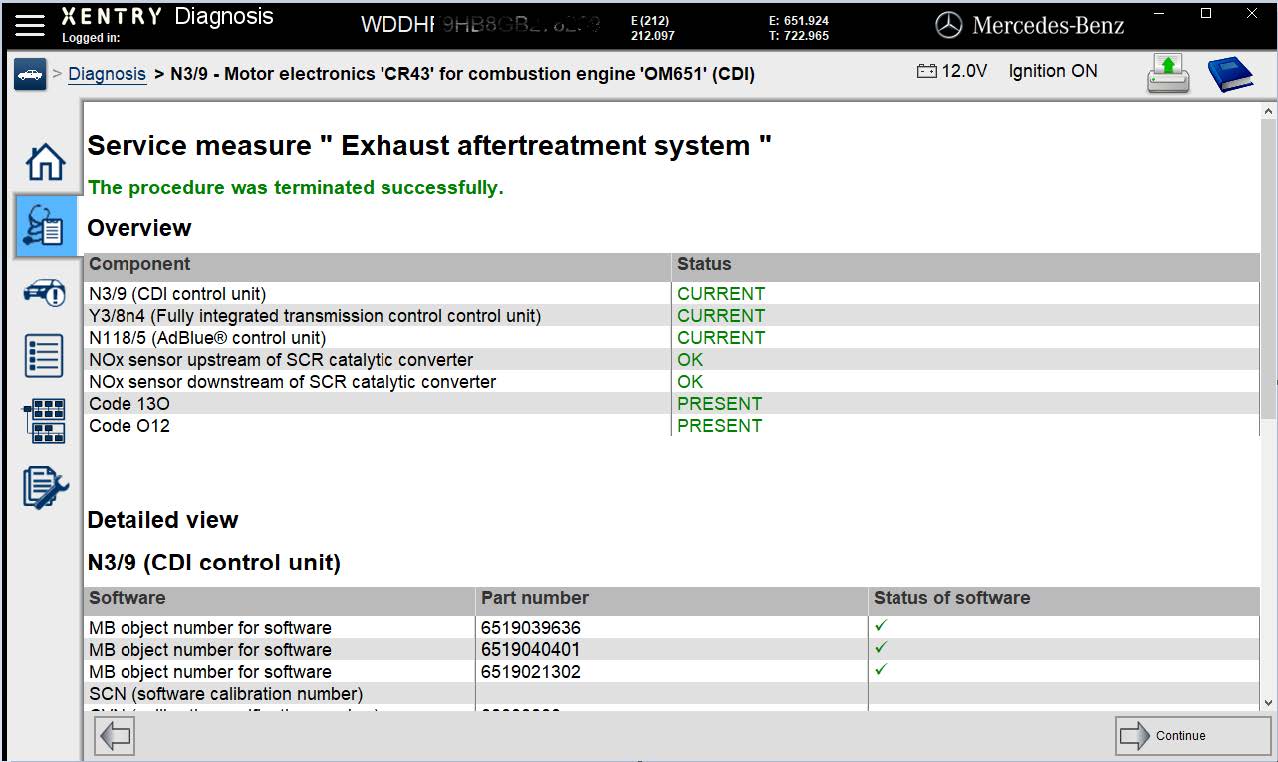
Figure 7
- Perform a final quick test and transmit to paperless SDS.
Faults stored in the memory, caused by disconnected lines during the inspections, must be deleted from the fault memory after completing the work.
The procedure via the diagnostic system is shown on the following pages.
If faults are present and stored they need to be addressed. Create a PTSS case
- Clean the bonding surface of the hood and attach the AEM-label (Figure 8).
The fields on the adhesive label must be filled out correctly. Please use black permanent marker.
Refer to (Figure 6) within the Xentry procedure
The adhesive label can be applied to the hood while updating the software for the engine control unit. Failure to comply may result in dealer debit and/or possible fines.
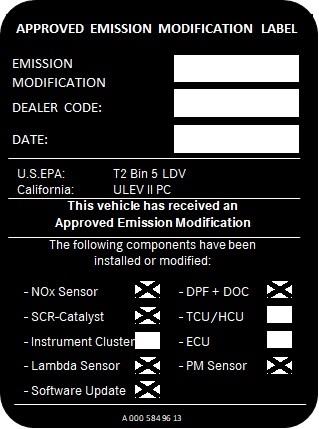
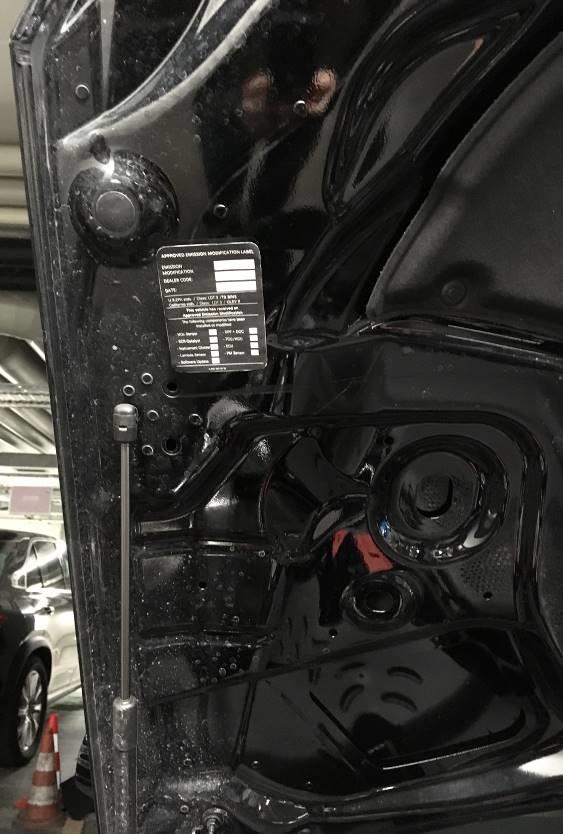
Figure 8
Primary Parts Information
| Qty. | Part Name | Part Number |
| 1 | Parts kit (2x NOx sensors) | A 642 905 11 00 85 |
| 1 | PM sensor | A 000 905 05 08 |
| 1 | SCR catalytic converter | A 212 490 45 00 80 |
| 1 | Part kit Combination box (DOC+DPF) | A 212 490 74 00 85 |
| 1 | AEM-Label | A 000 584 96 13 |
| 1 | Screw plug | N 007 604 01 81 09 |
| 1 | Sectional sealing ring | A 021 997 62 45 |
| 1 | Plug housing | A 000 545 40 39 |
| 1 | Exhaust clamp | A 000 490 14 41 |
| 1 | Bracket | A 221 492 03 18 |
| 3 | Nut | A 120 142 00 72 |
| 1 | Bracket | A 212 490 00 44 |
| 2 | Nut | N 000000003175 |
Small parts such as screws, stop nuts, sealing rings, cable ties, liquids, sealants, etc. that are not listed in the parts list. The small parts required (per WIS instruction) are included in the cost and can be claimed.
Warranty Information
Operation: Replace components of the exhaust system
Includes: Carry out commissioning the Control units (CDI, VGS, SCR) with XENTRY and affix AEM Label.
| Damage Code | Operation Number | Labor Time (hrs.) |
| 49 920 21 7 | 02-1744 | 3.4 |
Note Operation labor times are subject to change
P-EC-2020050030
Modification to the emission control system
Model E-Class diesel vehicles (212 4MATIC platform)
Model Year 2014-2015
Modification to the emission control system
Model E-Class diesel vehicles (212 4MATIC platform)
Model Year 2014-2015
Mercedes-Benz Reprogramming
All information in regard to Mercedes-Benz J2534 compliant software is available free of charge and found under the MB Workshop Resources tab on the home page of www.startekinfo.com
J2534 complaint software for Mercedes-Benz vehicles is available for purchase from Mercedes-Benz USA.
In order to use the J2534 complaint software for Mercedes-Benz vehicles, the purchaser must furnish their own:
- Windows based PC or laptop*
- J2534 compliant interface box*1*
*Must be purchased from a third party company and are not available from Mercedes-Benz USA LLC.
*1* suggested listing of J2534 interface boxes is located within the J2534 Pass-Thru User’s Manual which is posted for view without cost under the MB Workshop Resources tab on the home page of www.startekinfo.com
Vehicle Coverage
J2534 complaint software for Mercedes-Benz vehicles has coverage for all required functions associated to reprogramming, initialization, and fault clearing of emission control modules (engine and transmission) fitted to vehicles 2004 Model Year and newer. Additionally all access and functionality required in regard the configuration via SCN Coding and/or CVN Coding is covered.
J2534 complaint software for Mercedes-Benz vehicles is delivered via DVD media which is delivered monthly for the license term of one year upon purchase.
- All control unit software (reprogramming calibrations) is contained within J2534 DVD media.
Terms and conditions
J2534 complaint software for Mercedes-Benz vehicles is purchased in 1-year license increments. During that license term the user will receive an initial software package, license key, SCN/CVN Coding information/access as well as monthly updates via DVD media.
- Additional updates of software after the 1st year can be purchased at additional cost, however are not required for the system to continue functioning.
For pricing and additional information via the internet, please refer to the information at the beginning of this section.

- J2534 Pass-Thru Programmer: TOPDON RLink J2534 is an advanced diagnostic and reprogramming tool that support all J2534 protocols, as well as D-PDU, CAN-FD and DoIP, ensuring compatibility with a wide range of modern vehicles. It offers extensive versatility with support for over 18 major automotive brands, including Chrysler, Ford, GM, Nissan, Toyota, Honda, Subaru, Land Rover/Jaguar, Volvo, Wuling, Volkswagen/Audi, Mercedes-Benz, and BMW. NOTE: Not compatible with Ford IDS diagnostic software
- All-in-One OEM Diagnostics: This J2534 ECU programming tool elevates your automotive repair capabilities to new heights by delivering complete OEM diagnosis. Boasting comprehensive full-system diagnostics, intuitive repair guides, advanced ECU programming and coding, common reset services, a vast library of repair information and more, this all-in-one solution empowers technicians to effortlessly tackle complex vehicle issues with ease. *Not compatible with 24V vehicles
- Proven Performance You Can Trust: Backed by over 10000 real vehicle tests and benefit from a wealth of practical experience, this OEM reprogramming tool guarantees stable and exceptional performance. Supported by TOPDON's dedicated technical experts with in-depth knowledge of both auto repair and J2534 Pass-Thru programming, the RLink J2534 provides prompt and professional assistance, ensuring a smooth setup and reliable compatibility
- Integrated Excellence, Always Up-to-Date: Featuring the exclusive RLink Platform to provide a streamlined experience with one-click driver installation and management, ensuring flawless integration with your OE software, maintaining the original performance quality. The built-in operation guide makes mastering OE software quick and easy, so you can get started right away. Plus, with lifetime free updates, your diagnostics will stay current with the latest drivers and innovations
- Efficiency Meets Versatility: Engineered to support three CAN channels simultaneously - CAN FD and CAN-CC included, giving you the edge in fast troubleshooting. To perfectly synchronized with the OE software, please diagnose with active subscriptions and make sure your computer system is running a compatible 64-bit Windows version (7, 8, 10 or later) to fully leverage the power of RLink J2534. *We don't provide extra OE software

- Advanced VCI Box, Industry-leading J2534 Pass-Thru Technology: This J2534 Pass-Thru Programmer is designed espically for technicians, independent shop owners, and DIY enthusiasts, enables fast, reliable computer-based programming. It supports all J2534 protocols—including the latest DoIP and CAN FD—ensuring full compatibility with both legacy and next-generation vehicles.
- High-Speed OEM-Level Diagnostics & Programming: Unlock true OEM functionality with comprehensive system diagnostics, guided troubleshooting, coding, adaptations, resets, and programming—all designed to slash repair time. This all-in-one tool eliminates the need for multiple OEM devices, boosting efficiency and cutting costs. Equipped with High-Speed USB, it delivers 10x more data per second than competing solutions
- Coverage for 17 Car Brands & Ultra Reliability: Works seamlessly for Chrysler, for Ford(Forscan), for GM, for Nissan, for Toyota, for Honda, for Subaru(SSM4), for Land Rover/Jaguar, for Volvo, for Wuling, for Volkswagen, for Mercedes-Benz, and for BMW. Backed by over 10000 real vehicle tests and benefit from a wealth of practical experience, this OEM reprogramming tool guarantees stable and exceptional performance
- User-Friendly RLink Platform & Expert Support: TOPDON’s proprietary driver management platform offers a clean interface and lifetime free updates. Access a rich library of real-world case studies to stay ahead of the curve. Backed by a support team with 10+ years of J2534 and automotive repair experience, we provide one-on-one assistance to resolve any technical issue.
- 6.6 ft USB-C Cable & Portable Storage Case: The RLink J2534 diagnostic tool features a 6.6ft USB 2.0 Cable and a 1.2 ft OBDII Extension Cable, allows to connection your computer easily outside the vehicle. The included handled carry case offers easy portability, storage, and hanging options—keeping your gear clean and ready to go, anywhere.

- Dual WiFi & 10.1" Touchscreen: Provides a stable, high-speed wireless link 3x faster than bluetooth, and a responsive, professional interface. Topdon ONE obd2 scanner diagnostic tool ensures smooth, non-lagging diagnostic scan, boosting mechanic efficiency
- J2534 Pass-Thru Support: The included ONE VCI supports the J2534 standard, allowing it to function as a pass-thru device when paired with OEM diagnostic software.Through TOPDON’s RLink platform, technicians can perform dealer-level coding, expanding in-house capabilities without investing in multiple factory automotive scan tools
- OE Topology Mapping: Visualize the vehicle’s ECU network exactly as it’s built.Zoom, pan, and highlight specific modules to pinpoint component issues with precision.Topology mapping displays real-time communication between modules
- 50+ Service Functions: Covers high-demand services like ADAS calibration, DPF regen, TPMS reset, ABS bleed, and throttle adaptation.Expands your service menu, allows you to charge premium rates, and turns away zero jobs due to lack of tooling. Vehicle-specific functionality may vary
- Advaned ECU Coding: 10 of the most serviced brands in North America, including full ECU coding and flash hidden support for BMW, VW, Au-di, Benz, Porsche, Toyota, Ni ssan and more. Enables module replacement, feature customization, and personal settings with automatic backup or restore.Lets your shop safely offer high-margin customization services, attracting more customers and boosting profit

- [J2534 Pass-Thru Programmer] - TOPDON RLink J2534 is engineered for professional technicians, delivering OEM diagnostic and reprogramming capabilities. It supports all J2534 protocols, CAN-FD, DoIP, D-PDU. Compatible with 17 vehicle brands—such as Chrysler, Ford, GM, KIA, Hyundai, Nissan, Toyota, Honda, Subaru, Mitsubishi, MAZDA, Land Rover/Jaguar, Volvo, Volkswagen/Audi, Mercedes-Benz, and BMW. RLink J2534 can help reduce the cost of purchasing equipment from different brands.
- [All-in-One OEM Reprogramming and Diagnostics] - When seamlessly integrated with OEM diagnostic software, this dongle enables you to perform a wide range of functions, including ECU programming and coding, DTC reading and clearing, active tests, component matching, adaptations, rewriting, guided troubleshooting, and more. This all-in-one tool eliminates the need for multiple OEM devices, significantly boosting work efficiency.
- [Tested, Trusted, and Proven for Accuracy] - TOPDON RLink J2534 is renowned for its reliability, having successfully completed over 10,000 real-vehicle tests. The wealth of data and hands-on experience behind it ensures consistent performance and accurate results. You can trust this tool to deliver optimal performance.
- [One-Click Installation, Continuous Updates] - The exclusive TOPDON RLink platform streamlines installation with a one-click driver setup, allowing you to quickly access OEM software for diagnostic and reprogramming tasks. With lifetime free updates, your RLink J2534 stays current without any additional cost, ensuring reliable performance for the long term. *We don't provide extra OE software.
- [Works with Windows Compatibility and OEM Software Subscription] - The RLink J2534 supports three CAN channels - including CAN FD and CAN-CC, providing advantages in the process of rapid troubleshooting. Compatible with Windows 7, 8 and 10 (64-bit) and higher versions of the system. For full functionality, an active OEM software subscription is required for each supported vehicle brand. Please note that the dongle does not include OEM software, which must be purchased separately to access brand-specific diagnostic and reprogramming features.
- 💯【Conta.ct us for Support Directly】For any issues experienced after purchase, please reach out to: 📞autelsupply@ outlook. com🛣️. Our team will provide perfect solution for you. For tech support or [explore additional accessory], please cont.act our team: 📞autelsupply@ outlook. com🛣️.
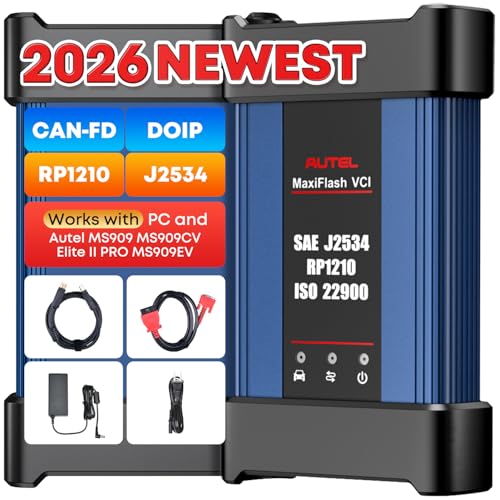
- 🌎【Autel J2534 Pass-Thru Progra.mmer】As an OEM Pass-Thru Progra.mmer Vehicle interface for multiple makes, Autel MaxiFlash J2534 support all J2534 protocols, D-PDU, CAN-FD and DoIP protocols. 2026 newer Autel MaxiFlash J2534 VCI can works with P-C and download OEM vehicle software, seamlessly conduct OE-level diagnostic-progra.mming-c0ding. Also, Work with Elite II Pro/ Ultra Lite/ MS909/ MS909CV/ MS909EV to directly pro.gram on Merce.des-Be.nz & BM.W. Autel J2534 Progr.ammer is a multi-functional device and supports 10+ major brands, including for Hond.a, G.M, LandRo.ver, BM.W, Chrysl.er, For.d, Hyun.dai, Ki.a, Merc.edes B.enz, Toyot.a, Volksw.agen etc.
- 🌎【Enhanced Protocol: J2534/D-PDU/RP1210/CAN FD/DoIP】Autel MaxiFlash JVCI is a blueto.oth communicate device, it supports latest CAN FD DoIP CAN protocols, compliant with automotive D-PDU/ J2534/ RP1210 standards. It can perform standard PassThru J2534 functions: compatible with Toyota Techstream, Volvo VIDA, Honda HDS, Jaguar Land Rover IDS and BM.W 3G for OEM diagnostics. CAN FD protocol is mainly for GM 2019+, DoIP protocol is mainly for Volvo 2018+, for L-and Rover/for Jaguar 2017+, for BM.W F chassis and G chassis.
- 🌎【Compatible with P-C/ WIND.OWS 】The Autel J2534 VCI can be connected to a compu.ter via a data cable; once the corresponding OEM software is installed, it enables do advanced progr.amming and c0ding on your vehicles. Easy Steps: 1) Connect to P-C via a USB cable 2) download OEM vehicle software 3) Start Diagnose. Take For.d for example, you can download OEM software on mot.orcraft.erservi.ce website, such as: For.d Diagnostic Software downloads, As B.uilt Data, Updated Cali.bration information, then use different software do relevant features.
- 🌎【Work with Autel Elite II Pro/ Ultra Lite/ MS909/ MS909CV/ MS909EV】This 2026 latest Autel J2534 Pass-Thru VCI is 100% compatible with Autel Elite II Pro Ultra Lite MS909 MS909CV MS909EV to perform advanced functions from diagnose to progra.mming.
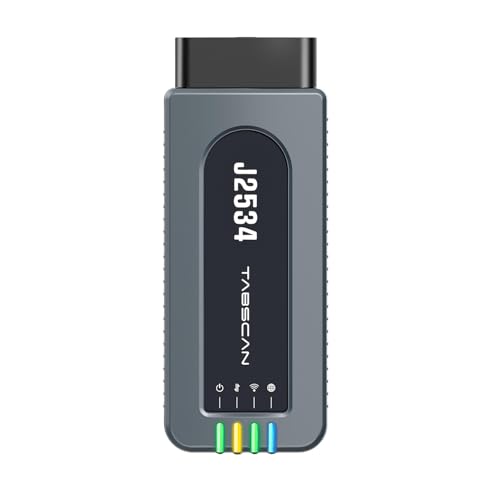
- 【J2534 Pass-Thru Device】 This budget-friendly J2534 pass-thru device delivers OEM diagnostics and reprogramming capabilities for dealerships, repair shops and automotive DIY enthuisasts, enables you diagnose, program and repair the vehicles more efficiently and precisely. Supporting J2534, D-PDU, CAN-FD and DoIP, this J2534 passthru tool ensures wide vehicle coverage. It's compatible with OE software application, ensuring seamless integration and original performance quality
- 【All-in-One Diagnostic Tool】 Simplify your workflow and tackle the complex diagnostics and repairs with confidence! This J2534 passthrough tool provides full system diagnosis, bi-directional control, maintenance reset services, ECU programming and ECU coding to run advanced diagnostics and programming. Equipped with the specialized platform, this J2534 pass-thru tool is fully compatible with OE software that helps technicians confidently handle complicated vehicle repair issues
- 【J2534 Diagnostic Tool】 The Tabscan J2534 pass-thru device is built with a dedicated platform, making it ideal for both professional and personal use. Simply download the driver for your ford vehicle within the platform—ensuring only one driver is installed at a time. Then connect the device to your vehicle’s OBD2 port and link it to your computer using the included USB A to USB C cable. Finally launch your OE software, select Tabscan J2534 VCI as interface, and begin diagnose and program
- 【Universal Compatibility】 Tabscan J2534 reprogramming tool is designed to be compatible with Ford vehicles for advanced diagnostics and programming. It supports J2534 protocols, along with D-PDU, CAN-FD and DoIP, ensuring seamless connectivity with older or modern vehicles. This J2534 diagnostic tool only works with computer running on windows 7/10/11. Vehicle compatibility varies by model or year, please confirm with us before purchase. Note: It's not compatible with 24V vehicles
- 【Professional Technical Support】 Tabscan J2534 pass-thru device provides a stable and seamless connection between your vehicle and computer for diagnostics, programming, and coding. But that's not all—we go beyond hardware. Our dedicated technical support team brings deep expertise in automotive diagnostics and programming. Whether you need help with setup, troubleshooting or latest diagnostic resources and upgrades, we provide fast, professional and reliable support every step of the way
This product presentation was made with AAWP plugin.